 By
By A good developer tool wearing a consumer detector's clothes. The usage-based API, a $5 minimum and enterprise security make Sapling the cheapest way to put AI detection inside your own product. As a detector for people, it is mid-table at best, with the highest false-positive rate in the one large independent benchmark we could find, and a free check too short for a real essay.
- Best for
- Developers and small platforms adding detection at low volume; teams already using Sapling's assistant
- Skip if
- You are judging students or writers, or you only want a detector and not a writing assistant
- Price
- Free 2,000 characters; Pro $25/mo or $12/mo annual; API from $0.005 per 1,000 characters
- Company
- Sapling Intelligence, Y Combinator Winter 2019
Who makes Sapling, and what the detector is for
Sapling Intelligence went through Y Combinator in the Winter 2019 batch, and its YC listing names Ziang Xie as founder and describes a very small team. It does not sell itself as a detector company. The homepage describes an enterprise language-model toolkit: grammar checking, autocomplete, snippets and rephrasing that sit inside Zendesk, Salesforce, ServiceNow, Gmail and the rich-text editors developers build on. The customer logos are anonymised ("a Fortune 50 healthcare company", "a Nasdaq-100 software company"), which is common in enterprise sales and slightly frustrating in a review.
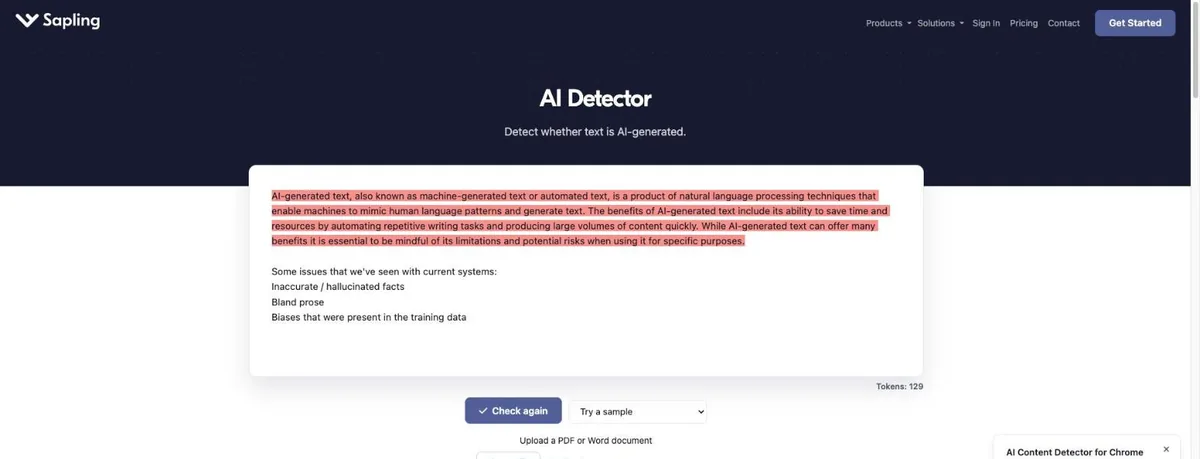
The AI detector arrived as one more endpoint on that toolkit, and the public web page is essentially a demo of it. You paste text or upload a PDF or Word file, it returns an overall probability that the text is AI-generated and highlights the sentences that drove the score. Sapling is careful to say the overall score is not the percentage of words written by AI, and that sentence highlights can disagree with the overall number because they are local signals. More vendors should print that.
There is also a Chrome extension, which pops up in the corner of the detector page within seconds of landing on it.
The design choices tell you who Sapling had in mind. The page counts tokens, not words. The API documentation is cleaner than the consumer page, with a single endpoint, a 300-character minimum and requests of up to 200,000 characters. And the detector sits beside sentiment analysis, spellcheck and autocomplete endpoints priced on the same per-character model. This is infrastructure that a support platform or an edtech start-up plugs in, rather than a destination for a worried student at midnight, and it is fairest to judge it on those terms first.
How we checked it
We did not build our own benchmark. What we did do was read every page that currently ranks for this tool, trace each accuracy figure in them back to whoever produced it, and throw out the ones we could not trace. That removed a surprising amount. Several reviews quote a precise accuracy figure by content type and cite a testing site we could not find; we have left those numbers out. We then read Sapling's detector page, pricing page, API pricing documentation and security page, and checked Trustpilot and G2.
Most reviews of Sapling are written for students wondering whether it will flag their essay. Almost none of them price the API, which is the only part of the product we would actually recommend paying for. So we did the arithmetic.
Accuracy and the false-positive problem
| Source | Result | Sample | Who ran it |
|---|---|---|---|
| Sapling's own testing | About 97% (cited by third parties) | Not published | Vendor claim |
| Sapling model update (Sep 2026) | False positives "fell by 60%" | Not published | Vendor claim |
| Poignant Guide benchmark (Mar 2026) | 76% accuracy, 17% false positives | 2,400 texts, half human | Independent site, no vendor ties claimed |
| Scribbr comparison (revised Jul 2026) | 68% accuracy, 0 false positives | 30 texts | Scribbr, which sells a competing detector |
| Originality.ai test (Nov 2025) | Missed AI in 3 of 7 samples | 7 Jasper texts | Originality.ai (competitor) |
The number that matters is the second independent one. The Poignant Guide benchmark, updated in March 2026, ran 1,200 human texts and 1,200 AI texts through ten detectors at default settings and measured Sapling at 76 percent accuracy with a 17 percent false-positive rate. Put plainly, about one human text in six was called AI. That is in the same territory as ZeroGPT, the tool our detector comparison tells readers to avoid. The same benchmark scored GPTZero at 87 percent.
Scribbr's smaller 30-text test is kinder. It put Sapling fifth of twelve at 68 percent, with no false positives on its five human texts, and said it caught every GPT-3.5 text but only 60 percent of the GPT-4 ones. The weakness on newer models is the more useful finding, because that is the gap every detector fights and the one that grows fastest. Scribbr also noted it was unclear how to read Sapling's two different highlighting views, which matches our own experience of the page.
Sapling's response is a September 2026 model update it says cut false positives by 60 percent and added coverage for GPT-5, Claude 4.5 and Gemini 2.5. If that holds up, the 17 percent could fall to something nearer 7. Nobody independent has re-tested it yet, so for now that is a claim, and we have scored the evidence we have.
Bottom line on accuracy. Fine at spotting long, unedited output from older chatbots, shakier on current models, and too willing to call humans machines in the one large test we trust. The free demo's 2,000-character cap pushes you into exactly the short samples where that weakness is worst.
Pricing, and what a developer actually pays
There are two ways to pay Sapling, and they suit different people. Prices are as of October 7, 2026, from Sapling's pricing page and API documentation.
| Plan | Monthly | Annual (per month) | Detector limit per check | Notes |
|---|---|---|---|---|
| Free | $0 | $0 | 2,000 characters | 5 files per batch |
| Pro | $25 | $12 | 100,000 characters | Autocomplete, rephrase, snippets, chat assist; 1 month free for new users |
| Enterprise | From $15/seat, 10-seat minimum | 100,000 characters | SSO, analytics, self-hosting options | |
| API, first 10M characters | $0.005 per 1,000 characters | 200,000 characters per request | $5 minimum purchase; 300-character minimum text | |
| API, 10M to 50M | $0.00375 per 1,000 | Volume tier | ||
| API, 50M to 100M | $0.0025 per 1,000 | Above 100M, contact sales | ||
Now the worked example. Imagine a small online course platform that wants to screen 400 written assignments a month, each about 1,200 words. English runs at roughly five characters a word in Sapling's own maths, so that is about 6,000 characters an assignment and 2.4 million characters a month. At half a cent per thousand characters, the bill is $12 a month. The $5 minimum purchase covers a million characters, or around 200,000 words, so a hobby project could run for months on a single top-up. Re-submitting the same text within three days is cached and not charged again, which matters while you are testing.
Compare that with the alternatives. GPTZero only offers its API on the Professional tier at $45.99 a month, and Originality.ai puts API access on its $179 Enterprise plan. Even at ten times our example volume, 24 million characters, Sapling would charge about $50 for the first ten million and $52.50 for the next fourteen, around $102.50 in all. Two caveats: Chinese, Japanese and Korean text costs 2.5 times as much, and Sapling's API is a detector that you then have to explain to your users, with all of the false-positive baggage above.
If you do build on it, decide in advance what your product will do with the number. We would not show users a bare percentage. Show the sentence highlights, set a high threshold before anything is labelled, never trigger an automatic penalty, and give the person on the receiving end a way to respond. That costs nothing extra and it is the difference between a screening aid and a false-accusation machine with your logo on it.
For individuals, the maths is less kind. Pro at $25 a month, or $144 a year on annual, is priced as a writing assistant. If all you want is to check essays, that is more than GPTZero's $14.99 entry plan for a detector with a weaker independent record.
The free check, and the one-month trial
Two thousand characters is roughly 300 to 400 words. A 1,000-word essay therefore needs three separate pastes, each scored without the context of the others, and short chunks are exactly where detectors are least reliable. It is fine for a paragraph you are curious about. It is a poor way to check a whole piece.
Sapling's own page says no AI content detector, including its own, should be used as a standalone check, and that false positives are more likely on shorter, generic or essay-like text. That last category describes most student writing.
The better free option is the trial. Sapling gives every new account a month of Pro automatically when you confirm your email, which raises the limit to 100,000 characters a check. If you want to evaluate the detector seriously, or the writing assistant, do it inside that month and decide before it ends.
Security and privacy
This is where Sapling's enterprise roots pay off. Its security page says the company is SOC 2 Type II certified and GDPR compliant, supports customers with HIPAA and PCI requirements, encrypts data with TLS in transit and AES-256 at rest, and runs annual penetration testing. Enterprise customers get PII redaction, SSO, SCIM, custom retention and the option to self-host. Those are vendor statements, but they are the specific kind a procurement team can ask to see evidence for, which is more than most detectors in this category offer. QuillBot, for comparison, does not list SOC 2 at all.
What the public pages do not say clearly is whether free-tier text is used to improve Sapling's models. The security page points to a separate trust centre for that. If you are pasting anything confidential, use an account with a data agreement or the API, not the anonymous demo.
What users say, such as there is
There is not much to go on, and that is itself a finding. Trustpilot shows 2.4 out of 5 from just seven reviews, none from the last twelve months. Four are one-star, and the theme is the one you would expect: human writing flagged as AI. One reviewer said they pasted their own text and the whole thing came back as AI; another complained about memory use and a clunky interface in the extension. The three five-star reviews praise the writing assistant, not the detector. G2 is warmer at 4.2 from 14 reviews, again mostly about the assistant.
"Pasted human written text into it and it said the whole thing was AI." Trustpilot reviewer, Sapling Intelligence page
Seven reviews are an anecdote, not a rating. We mention them because the complaint lines up with the 17 percent false-positive figure from a much larger test.
Sapling against QuillBot, GPTZero and Originality.ai
| Sapling | QuillBot | GPTZero | Originality.ai | |
|---|---|---|---|---|
| Free check | 2,000 characters | 1,200 words, 6/day | 10,000 words/mo | 60 credits/mo |
| Paid from | $25/mo; $12 annual | $19.95/mo; $8.33 annual | $14.99/mo | $14.95/mo |
| API | Usage-based, $5 minimum | None advertised | From $45.99/mo | Enterprise, $179/mo |
| Independent false positives | 17% (Poignant Guide) | Too few samples | 1 to 12% | 4.8 to 5.7% |
| Security claims | SOC 2 Type II, self-host | GDPR, CCPA, no SOC 2 | SOC 2, FERPA | No SOC 2 |
For a free look at your own writing, QuillBot's detector is more generous and needs no account. For publishing and agency work, Originality.ai has the better paraphrase record and the team features; our Originality.ai review goes into the credit maths. For teaching, GPTZero. Sapling wins one column clearly, the API row, and that is the column to buy it for.
Who should use it
Where it makes sense
- Cheapest way to add detection to your own app
- Clear per-character pricing with volume tiers
- SOC 2 Type II and self-hosting for enterprise
- Honest disclaimers on the results page
- Writing assistant included if you want one
- Month of Pro free for new accounts
Where it falls short
- 17% false positives in the largest independent test
- Free check too short for a full essay
- Pro is priced for the assistant, not the detector
- Weak on GPT-4-class text in Scribbr's test
- Hardly any user reviews to judge support by
Developers, small edtech and content platforms who need a detection signal in their own workflow and will show it to users with honest caveats should start here, with a $5 top-up. Support and sales teams already using Sapling's assistant get the detector as a bonus and should use it. Students, teachers and editors who want a score they can act on should not. The false-positive evidence is the worst of the credible tools in our comparison, and a detector that calls one human in six a machine has no business near a grade or a contract.
Questions readers ask about Sapling
Is Sapling's detector free?
Yes, up to 2,000 characters a check, roughly 300 to 400 words. New accounts get a month of Pro, which raises that to 100,000.
How accurate is it?
76 percent with a 17 percent false-positive rate in a 2,400-sample independent benchmark from March 2026. Scribbr's smaller test gave 68 percent.
What does the API cost?
Half a cent per 1,000 characters for the first 10 million, with a $5 minimum purchase, as of October 7, 2026.
Is Pro worth it just for detection?
No. At $25 a month or $12 on annual you are paying for the writing assistant. Buy it if you want that.
Is my text safe?
Sapling says it is SOC 2 Type II certified and encrypts data with AES-256. Enterprise customers can self-host.
Should a school use it to grade?
No. Sapling itself says no detector, including its own, should be used as a standalone check.
Verdict
Sapling is two products in one account. The writing assistant is a reasonable buy for support teams. The detector, judged as a tool for deciding whether a person cheated, is mid-table on catching AI and poor on sparing humans, and its own documentation is more cautious about it than most of the reviews that rank it. Judged as an API, it is cheap, simple and well secured, and nothing else in our comparison lets you start for five dollars. Buy it for that reason or not at all.